TS-RERA Guide for Beginners: How to Verify a Project and Stay Safe
Quick Answer
TS-RERA is the Telangana government authority that regulates real estate projects and protects homebuyers from fraud and delays. Before booking any property, you can use the TS-RERA portal to verify a project’s registration, approvals, construction status, builder details, and complaint history. A few minutes spent verifying a project can help you avoid costly mistakes.
There’s a lot for you to learn when you are thinking of purchasing a new home, since there are lot of terms to know and understand before you finally make a decision,and then TS-RERA is something you would see almost everywhere: on the brochures,in builders pitches and in every property listing almost.
For most first-time buyers, its something associated with safety and rules for the same, but there would be very few who would actually be aware to use the same for themselves. This article starts from the very basics of what you need to know and be aware of, assuming you don’t have any knowledge of RERA beforehand, and just a clear guide of what TS-RERA is and how to check on a project by yourself, and what the results would actually tell you.
What is TS-RERA and Why is it Important for Buyers in Hyderabad?
TS-RERA means the Telangana State Real Estate Regulatory Authority and it is a governing body which is established in line with the Real Estate (Regulation and Development) Act 2016 in order to have everything work properly in this sector.
Prior to RERA, a buyer had no real way to find out whether the developer possessed the required approvals or whether the given estimated date for completion was at all credible, or whether the money collected for a given project was even being used for completing that project.
But, RERA changed all of this as now it is compulsory for developers to register any project with the authorities before advertising or selling any of the units. In Telangana, any residential or commercial project with a size of over 500 square metres or comprising eight or more units must adhere to this rule.
Be Among the First to Own a Legacy
The TS RERA Login is a secure portal for registered stakeholders, such as builders, promoters, and real estate agents, to access their accounts, register projects, submit applications, upload documents, and manage regulatory compliance. The TS RERA Search, on the other hand, is a public feature that allows homebuyers and other users to verify a project’s RERA registration, check a builder’s credentials, and access other publicly available information without creating an account or logging in. In simple terms, the login portal is meant for managing and updating records, while the search feature is designed for verifying and viewing them.
Once they have registered with TS-RERA, developers are legally obliged to provide the public information such as project layout, approvals, developer’s details, expected date of completion and regular updates on progress of the construction process.
This is the part that matters most for a buyer. TS-RERA isn’t just a registration stamp. It’s a live, checkable record that anyone can look up before handing over a booking amount, and that’s exactly what this guide will show you how to do.
The Fast First Check: Spotting the TS-RERA Logo
Before you even open the TS-RERA website, there’s a quick first check you can do on the spot, whether you’re looking at a brochure, a hoarding, or a builder’s website.
Every project that is genuinely TS-RERA registered is legally required to display its RERA registration number on all promotional material, including advertisements, brochures, and agreements. Registered projects also commonly display a TS-RERA logo or badge alongside this number.If you failed to find the registration number among the builder’s advertising materials, that, alone, is cause for caution.
Having said that, take the logo and the number as anchors, not conclusions.Logos can be copied, and numbers can be printed on material even after a registration has lapsed or been revoked.
A number that starts with “P” followed by digits is the format used for Telangana project registrations, which at least tells you it’s shaped like a real one. But shape alone doesn’t confirm validity. The only way to actually confirm a registration is genuine and current is to look it up directly on the TS-RERA portal, which is the next step.
Step-by-Step: Finding a Project on the TS-RERA Portal
This part is what frightens amateurs, although it might not be as complicated as it seems, actually.
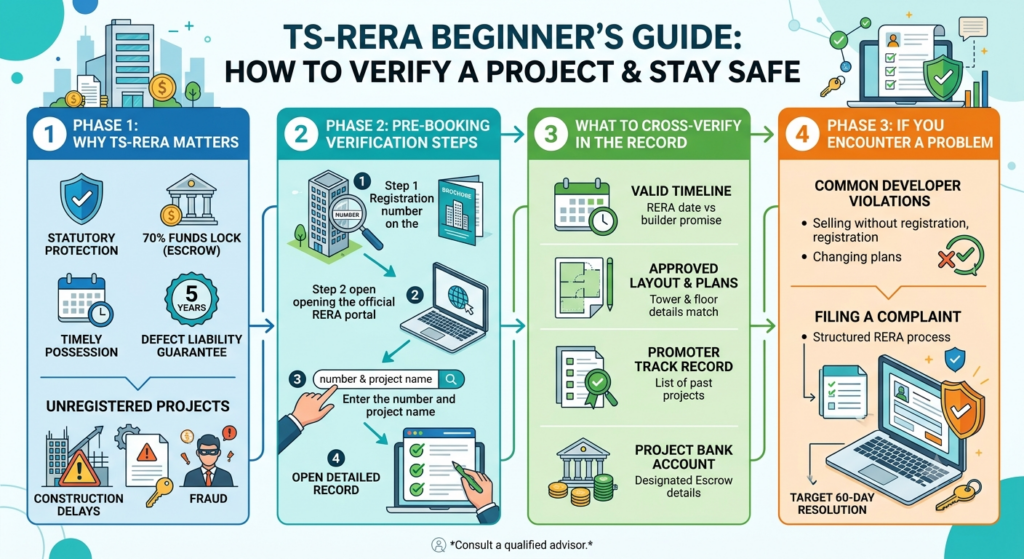
Step 1: Go to the TS-RERA official page. You need to open your browser and visit the website rera.telangana.gov.in. As TS-RERA is a government website, be sure to avoid similar web pages you might come across because of some advertisement or email containing the link instead of typing it out from your memory.
Step 2: Find the search for projects section. Upon entering the home page, search for something like “Search for Registered Projects and Agents” link or “Projects” located in the main menu. Usually, it is not hard to find this link as it is usually available at the top of the page or among the main service links.
Step 3: Enter your search details. You may search by using any detail you have on hand. For instance, one might consider either the name of the project of the name of the promoter/builder, or the RERA registration number, should it have been previously mentioned. It is generally preferable that the name of the project or the registration number is used because these two are more likely to yield more obvious results.
Step 4: Go through the list of matching results. There may be more than one matching entry. If there is more than one entry, it is necessary to verify the promoter’s name or the place mentioned with each entry to determine if it is indeed the progressive business project one is looking for.
Step 5: Open the project’s full record. Click on the correct project to open its detailed registration page. This is where the real information lives, and it’s what the next section walks through.
If you already have a project’s exact RERA number in hand, from a brochure or a builder’s sales team, you can skip straight to searching by that number for the fastest, most direct result.
Reading the Results: What Registration Status Actually Means
Finding the project is only half the job. Understanding what you’re looking at matters just as much, and this is where a lot of first-time buyers get stuck.
Registration status. Every project record shows a current status, most commonly Registered, Under Process, Lapsed, or Revoked. “Registered” with an active, valid date range is what you want to see. “Under Process” means the application hasn’t been approved yet, which means the builder should not be marketing or selling units for that project at all.
“Lapsed” means the registration time has expired, which is normally the result of the project exceeding the scheduled finishing dates without renewal. “Revoked” is much more serious, as it would indicate that the authorities have cancelled the registration for a serious case of the violation of the rules.
Promoter and project details. The record should show the promoter’s name and contact information, the project’s approved layout and unit configuration, and the specific approvals it has secured. Cross-check this against what the builder has told you directly. A mismatch, even a small one, is worth asking about before you go further.
Escrow and financial details. RERA requires promoters to deposit a defined share of funds collected from buyers into a dedicated project escrow account, used only for that project’s construction and land costs. Where this information is disclosed on the portal, it’s a useful indicator that funds are being ring-fenced properly rather than moved freely across a builder’s other projects.
Quarterly progress updates. Registered promoters are required to file periodic progress reports. If a project’s page shows these updates being filed consistently and on schedule, that’s a reasonable sign the builder is meeting its ongoing compliance obligations, not just its initial registration requirement.
Expected completion date. This is the promoter’s own disclosed timeline, filed with the authority. It’s worth comparing this against whatever completion date the sales team quotes you verbally, since the two don’t always match.
Taken together, these details turn a page of registration data into a genuine picture of how a project, and the builder behind it, is actually performing against its obligations, not just what it promised at launch.
Checking a Builder’s Penalty and Complaint History
A clean registration record doesn’t automatically mean a builder has a clean track record elsewhere, which is why it’s worth going one step further and checking for any history of complaints or penalties.
The TS-RERA portal maintains records of complaints filed against registered promoters and any penalties imposed as a result. Searching a builder’s name, either through the project search or a dedicated promoter or agent search where available, can surface this compliance history. Any violations can lead the TS-RERA to impose important penalties, which might include administrative charges and requiring the builder to refund the customer. (Source)
The penalties might increase significantly in case of repeated violations or grave issues. The general track record of sanctions or unresolved complaints adds to your search efforts, signaling that you should investigate things deeper, irrespective of whether the complaints concern other projects.
For a more structured approach to reviewing a builder’s overall history rather than just a single project, it helps to work through a proper checklist for auditing developers before booking, and to understand how to verify a builder’s broader RERA track record across all of their projects, not just the one currently being marketed to you.
What to Do If a Project Isn’t Registered
If your search turns up no registration at all for a project that should qualify, meaning it’s above the 500 square metre or eight-unit threshold, treat this as a serious warning sign, not a minor gap in paperwork.
Selling or advertising a qualifying project without TS-RERA registration is a direct violation of the law, and it strips away every protection RERA is designed to give you, including the escrow requirement, the disclosure obligations, and your formal right to file a complaint if something goes wrong later.
Builders sometimes explain away a missing registration by saying it’s “in process” or “about to be filed.” Until that registration actually appears on the portal with an active status, there is no verified regulatory oversight on that project at all, regardless of what you’re told verbally.
The safest course of action is straightforward: do not pay a booking amount or sign any agreement for an unregistered qualifying project. If a builder is genuinely close to completing registration, there’s no real harm in waiting until it appears on the portal before committing your money. If you’ve already paid something toward an unregistered project, you can raise a formal complaint with TS-RERA, which has the power to direct refunds with interest in addition to penalising the promoter.
Do’s
- Verify the project’s TS-RERA registration number on the official portal.
- Check the project’s registration status, approvals, and completion timeline.
- Review the builder’s complaint and penalty history before booking.
- Compare the portal details with the builder’s brochures and promises.
- Confirm the project files regular progress updates on TS-RERA.
Don’ts
- Don’t rely solely on the TS-RERA logo in advertisements.
- Check before you book a property without verifying its registration status.
- Don’t ignore projects marked Under Process, Lapsed, or Revoked.
- Need not rely and trust only verbal assurances that registration is “coming soon.”
- Don’t pay a booking amount for a qualifying project that isn’t registered.
TS-RERA Mobile App: Verifying Projects on the Go
For buyers who’d rather check a project while standing in a sales office or walking a site, rather than waiting to get to a laptop, TS-RERA related project search is also accessible in mobile-friendly form through the authority’s portal, which is built to work smoothly on a phone browser.
The general procedure of the search is the same as during desktop research: search for the project or builder name or registration number and check the records on the same status, builder information, and compliance history mentioned earlier. Notably, it is a special habit to keep this webpage open on your smartphone during the real visit and check the information provided by the sales representative right away, rather than trying to memorize it to find out later.
Key Takeaways
- TS-RERA enables buyers to verify projects before investing.
- Always check the registration status and builder details online.
- Complaint history can reveal a builder’s past compliance record.
- Avoid investing in unregistered or non-compliant projects.
- A few minutes of verification can prevent costly mistakes later.